
The goal was simple, I want to print bible verses on a table so I can print out multiple handouts on a single page. It would look something like the image below.
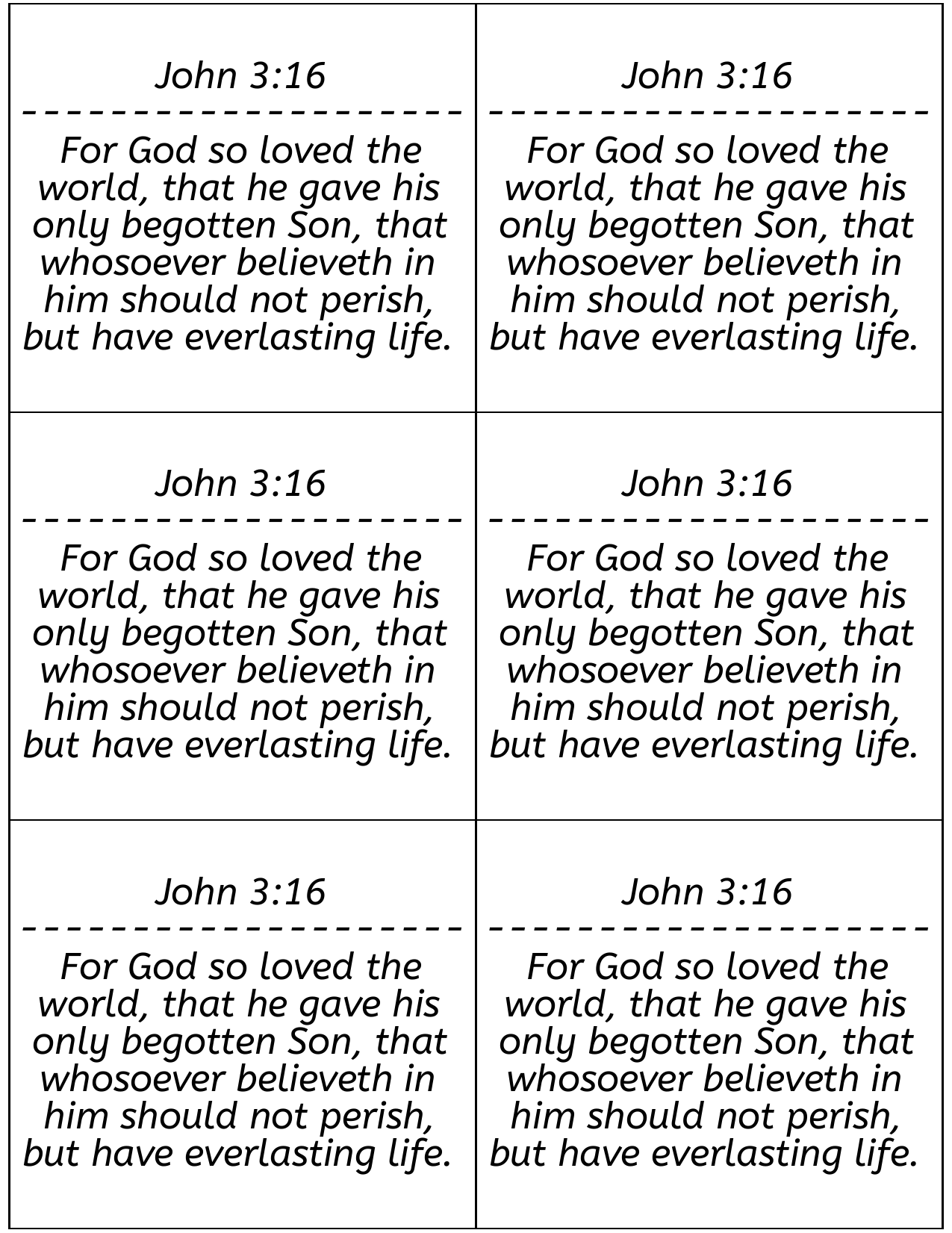
The idea struck me on the way to Church Sunday morning to use postscript to create the pdf. In my mind I could easily accomplish it in a couple hours that afternoon. After wolfing down my lunch I hurried to my computer to begin coding. The first issue I encountered is that I didn't remember the name postscript and the only thing I could type was typescript. After searching on Bing for awhile I found this video about postscript by "John's Basement." I quickly learned I needed an interpreter for the language. I chose GhostScript because it was the first result on Bing.
Armed with the documentation and software I needed I was ready to start coding. But then I thought, "Hey wouldn't it be great if I could put this on my website?" Now, if I put it on my website, I would want to create a preview of what the PDF would look like. I found a great blog showing how to use the html canvas element to 'real time' render postscript. In reality the blog demonstrates functions in javascript which perfectly imitate postscript statements. (I do not link it here, because last I checked it was compromised by an injection attack.) But then, if I had a preview I would need to be able to scale the preview so it would fit on my screen. But then I would need to be able to change the scale dynamically because some users have much larger screens. By now I should have noticed the feature creep but without another thought I began to code.
I quickly began implementing my plans. My webserver runs the php apache docker container, which uses Debian as the OS. I installed GhostScript in the container and will call it from php using shell_exec. I copied some postscript examples and verified it worked. I also copied some html canvas examples. Now, there were a few steps I needed to do.
Understand that in html the canvas element has a 2d context I call cvc (canvas context). This is the object that is used to draw on an html canvas. I include the code below to give come context to where it comes from, but all that is necessary to know is that cvc contains functions I call to draw on the html canvas.
var cv = document.getElementById("myCanvasId");
var cvc = cv.getContext("2d");cvc.strokeRect(x,y,width,height);%!PS
6 2.25 moveto
300 0 rlineto
0 262.5 rlineto
-300 0 rlineto
0 -262.5 rlineto
closepath
strokefunction pt2px(pt) {
// conversion based on W3C
return pt * (4/3);
}
function px2pt(px) {
// conversion based on W3C
return px / (4/3);
}While I am sure there are more efficient solutions, my plan to fit the text into the cells was simple. I would split the input into words, then keep adding words to a new line until its length was greater than the length of the cell. At that point I would add another line. Instead of not allowing lines to exit the cell vertically, I would let the user input text with more lines than fit in a cell. When a user sees their text going past the bottom of the cell I believe it is a very clear and succinct indication to the user their input is too large.
There was a problem. My plan didn't work, the words consistently went off the sides of cell. My measurement of words was off. I took the size in pixels (px) and multiplied it by the number of letters. The issue was fonts. The size of a font is its height, not the width. The width of each letter must be measured. My mind was spinning with the complexity of getting a unique measurement for every character. Fortunately, the html canvas context has a function to do this for me.
cvc.measureText(text).width;Next I wanted to add multiple pages. I leave out the details of creating the javascript because it is both complex and nothing exciting happened, until I tried to create a PDF from the postscript plaintext. When creating multiple pages the cells simply never ligned up. I checked my ghostscript version and it was very out of date. So I tried to install it from the Debian package repository, which reported I had the latest version. I think checked the version of my Debian container. It had not been updated in seven years. One week later, on an updated docker container and updated ghostscript version the issue persisted. The problem was that I didn't specify the page size in the postscript code.
%!PS
<< /PageSize [612 792] >> setpagedevice % Set page size to 8.5x11
%%Page: 1 1
6 2.25 moveto
300 0 rlineto
0 262.5 rlineto
-300 0 rlineto
0 -262.5 rlineto
closepath
stroke
...I foolishly added a drop-down selection box to allow users to choose fonts. To determine which fonts to add, I ran a command to get ghostscript to write to a file a list of supported fonts. I then copied this into javascript to create a selection of a lot of different fonts. I noticed the preview didn't work for all of those fonts but I knew they were supported. When the canvas is provided a font it does not recognize it uses the default font. So I shrugged it off and added a note which said "Preview may not support all fonts." But this had a problem. Remember earlier how I measured the width of a line?
cvc.measureText(text).width;Google Fonts are fonts Google created to solve this problem. It is a free service from which fonts can be included into webpages. The Google Fonts website will generate the html required to include the font in a html page for you. I provide an example here.
<link rel="preconnect" href="https://fonts.googleapis.com">
<link rel="preconnect" href="https://fonts.gstatic.com" crossorigin>
<link href="https://fonts.googleapis.com/css2?family=ABeeZee&family=Roboto&display=swap" rel="stylesheet">// family example: "ABeeZee"
function createFontLink(family) {
var link = document.createElement("link");
link.href = "https://fonts.googleapis.com/css2?family=" + family + "&display=block";
link.rel = "stylesheet";
document.head.appendChild(link);
}// family example: "ABeeZee"
// url example: "https://fonts.gstatic.com/s/abeezee/v22/esDT31xSG-6AGleN2tCUkp8D.woff2"
// page example: 1
function createFontLink(family, url, page) {
var newFont = new FontFace('"' + family + '"', "url(" + url + ")");
newFont.load().then((font) => {
document.fonts.add(font);
LOADED_FONTS.push(family); // I store loaded fonts so I don't load them twice.
addWords(page); // This redraws the page
});
}With fonts now loading I gleefully showed it off to my friends. They told me the font wasn't changing. My heart sank as I realized I only tested it in Firefox. Infact, it only worked in Firefox. Consulting google, it appears that woff2 isn't supported very well and most browsers are still using woff. So with the below change I finally got it working. In my list of font names and urls I only included woff2, so I had to go back and recreate the structure. Once that was done I had to update the new FontFace method with multiple urls. Supposedly the browser will only load the file it needs so I could include all the font files. But at this point I don't trust the browser with fonts, so I only included woff and woff2. With these two changes it now changed font on Edge, Firefox, and Chrome.
function createFontLink(family, url, page) {
    var fontName = option.innerHTML;
    var fontUrls = ["url(" + option.getAttribute("woff") + ")","url(" + option.getAttribute("woff2") + ")"];
    var newFont = new FontFace(fontName, fontUrls);
    newFont.load().then((font) => {
        document.fonts.add(font);
        addWords(page);
    });
    document.fonts.add(newFont);
    LOADED_FONTS.push(option.innerHTML);
}
I found a bash script that promised to install google-fonts on linux. It didn't work out of the box, I had to mark
several changes to get it to install correctly. But then I had to add them to ghostscript. A simple process in theory.
There is a file (in Debian that is), /usr/share/ghostscript/10.00.0/Resource/Init/Fontmap.GS
That file contains a list of fonts and to add a font I just need to add a line to the end like below:
/AbyssinicaSIL (/usr/share/fonts/truetype/google-fonts/AbyssinicaSIL-Regular.ttf) ;# font_convert.py
# I used this script to generate a list of family font names and woff2 urls of google web fonts.
# I grabbed the google-fonts.json from this repo: https://github.com/jonathantneal/google-fonts-complete?tab=readme-ov-file
# I do this because the google-fonts.json is 11mb, but what I need from it is only a couple hundred kb.
# Once the list is produced I copy it into the javascript where I want to use it.
import json
unsupported_fonts = ["Arima Madurai","Coda Caption","IM Fell DW Pica","IM Fell DW Pica SC","IM Fell Double Pica SC","IM Fell English","IM Fell English SC","IM Fell French Canon","IM Fell French Canon SC","IM Fell Great Primer","IM Fell Great Primer SC","Kumar One Outline","M PLUS Rounded 1c","Material Icons","Material Icons Outlined","Material Icons Round","Material Icons Sharp","Material Icons Two Tone","Material Symbols Outlined","Material Symbols Rounded","Material Symbols Sharp","Old Standard TT","PT Mono"];
woffUrls=[]
with open("google-fonts.json","r") as fid:
obj = json.load(fid)
for key in obj:
if (not key in unsupported_fonts):
#print(obj[key]["variants"])
if ( not "normal" in obj[key]["variants"].keys()):
url = obj[key]["variants"][list(obj[key]["variants"].keys())[0]]["400"]["url"]["woff2"]
woffUrls.append([key, url])
pass
else:
if ( not "400" in obj[key]["variants"]["normal"].keys()):
url = obj[key]["variants"]["normal"][list(obj[key]["variants"]["normal"].keys())[0]]["url"]["woff2"]
woffUrls.append([key, url])
pass
else:
url = obj[key]["variants"]["normal"]["400"]["url"]["woff2"]
woffUrls.append([key, url])
pass
print(woffUrls)# font_names.py
# attempts to match
import json
import sys
output = sys.argv[1]
with open(output,"w") as output_file:
font_names=[]
with open("google-fonts.json","r") as fid:
obj = json.load(fid)
for key in obj:
font_names.append(key)
file_names=[]
with open("font_filenames.txt","r") as fontfiles:
file_names = fontfiles.readlines()
def normalize_name(name):
# Normalize the name: remove spaces, convert to lowercase, and remove non-alphanumeric characters
return ''.join(e for e in name if e.isalnum()).lower()
# Dictionary to store matched pairs with lists
matched_pairs = {font_name: [] for font_name in font_names}
# Normalize and match
for font_name in font_names:
normalized_font_name = normalize_name(font_name)
for file_name in file_names:
normalized_file_name = normalize_name(file_name)
if normalized_font_name in normalized_file_name:
matched_pairs[font_name].append(file_name)
# Print matched pairs
i = 0
misses=[]
for font_name, files in matched_pairs.items():
found = False
for file in files:
if (normalize_name(font_name+"-Regular") in normalize_name(file)
or normalize_name(font_name+"[wght].ttf") in normalize_name(file)
or normalize_name(font_name+"[wdth,wght].ttf") in normalize_name(file) ):
nospace=font_name.replace(" ","")
nort=file.replace("\n","")
nort=nort.rstrip()
output_file.write(f"/{nospace}\t(/usr/share/fonts/truetype/google-fonts/{nort})\t;\n")
found=True
break
if not found:
if len(files) == 1:
print(f"[{font_name}] Only one indirect match. Setting to {files[0].rstrip()}")
elif len(files) > 0:
query_string = f"[{font_name}]No *-Regular, *[wgth].ttf, or *[wdth,wght].ttf file found, choose one of the following: "
for i in range(0, len(files)):
query_string += (f"\n{i}: {files[i].rstrip()}")
query_string+="\n"
opt=""
while (not opt.isdigit() or int(opt) > 0 and int(opt) > len(files)):
opt = input(query_string)
intOpt = int(opt)
output_file.write(f"/{nospace}\t(/usr/share/fonts/truetype/google-fonts/{files[intOpt].rstrip()})\t;\n")
else:
misses.append(font_name)
print(f"[{font_name}] no matches in [{files}]")
pass
print("could not find the following files")
print(misses)To say that I am glossing over a few steps would be an understatement. In my attempt to match up font names with their respective font files I encountered several exceptions. Some of those I have not resolved, as it stands the above python does not work as intended. Several font names didn't match up with any font files, so I added a list of font names to exclude. Some fonts are matching to their "-Italic" files instead of the correct "-Regular" files. But at this point I am dealing with familiar problem that is quite mundane.
I am very impressed with the capabilities of the html canvas element. Having fonts provided for free by Google is deserving of praise. I belive if I were to continue adding features and refining my PDF Table project it could eventually turn into a text editor. But we have Google Docs for that. Outside of correcting lingering issues with fonts, which are the problem, I belive this project is a success.
